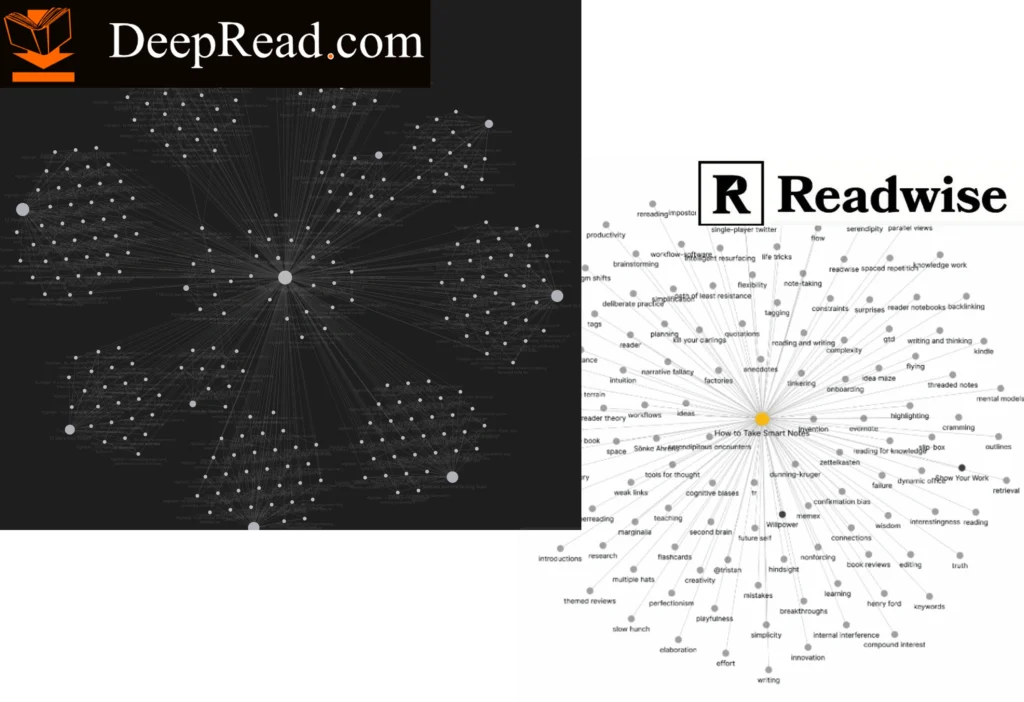
Readwise just dumps highlights. Obsidian deserves structure.
Your Kindle highlights need links, not flat lists. Sync through DeepRead and let the book’s original structure—chapters, sections, parts—do the connecting for you.
Kindle highlights in Obsidian, organized by chapters.
Watch highlights cluster around chapters and breakthroughs, revealing the book’s architecture. Nested by structure with the storyline intact–how the author intended it.
Test it in your Obsidian. Shape how we build it.
Sign up free on DeepRead and sync your Kindle highlights
Submit the form with your email, DeepRead username, and favorite book
Get structured markdown files—we’ll convert your highlights and send them to you
Import and explore your highlights clustered around chapters in your graph view
Share feedback—what works, what doesn’t, what you need
Shape the export we’re building to sync your library
We use cookies to ensure that we give you the best experience on our website. If you continue to use this site we will assume that you are happy with it.